
SVG vs PNG: When Vectors Beat Pixels
Swapping a 340 KB PNG logo for a 3 KB SVG is a familiar moment during a site audit, and the size gap comes from a real difference in how the two formats represent an image. Vectors describe shapes with math; pixels describe a fixed grid of color values. Knowing when each approach wins is what keeps logos sharp without dragging pages down.
What SVG Actually Is
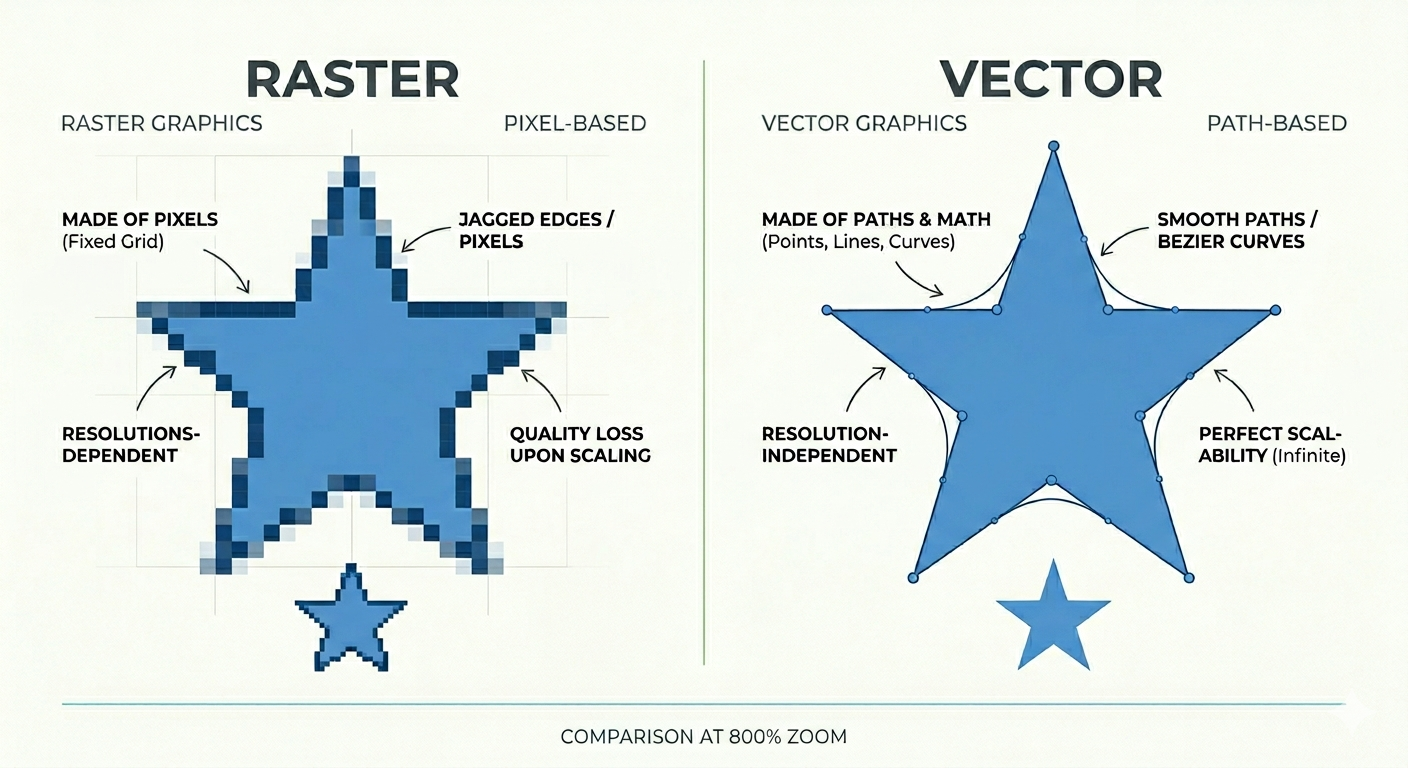
A PNG behaves exactly how most people expect a digital image to work. it is a grid of colored dots where every pixel is assigned a specific value. Your screen simply displays that grid. This is an intuitive and effective way to handle digital photography, but it is limited by the fixed nature of the pixel map.
While a PNG is a familiar grid of colored pixels, an SVG is actually a text file. It uses XML markup to describe shapes using mathematical coordinates. A circle in this format is not a collection of dots; it is a set of instructions defining a center point, a radius, and a fill color. Because these files are essentially code, you can open them in a text editor to modify them manually or use CSS to change the color of every icon on a website simultaneously. This technical structure fundamentally changes how the image behaves compared to traditional pixel-based formats.
Modern Scaling
The standard claim that SVGs scale infinitely without losing quality is true, but its importance has grown significantly over the last decade. When screen resolutions were lower, a PNG logo at its intended size usually looked crisp enough for the average user. However, the introduction of high-density displays changed the requirements for digital clarity. To avoid appearing blurry on a modern smartphone, an image must often be rendered at two or three times its CSS dimensions. A 200px logo now requires a 600px source file just to maintain a sharp appearance, resulting in a file with nine times the original pixel count.
An SVG is unaffected by screen pixel density because it relies on mathematical instructions rather than a fixed grid. A command to draw a shape renders perfectly whether a display has 72 or 572 pixels per inch. The file size remains the same regardless of the display scale, eliminating the need for multiple high-resolution variants. This provides a massive advantage for logos, icons, and diagrams. It is common for icon sets to shrink from 2MB of PNG assets to a mere 60KB when converted to SVG.
When PNG Still Wins
While SVGs are powerful, they are not a universal replacement for pixel-based images. The mathematical nature of vectors breaks down when an image consists of millions of unique color values with no geometric relationship, such as a photograph. While you can technically vectorize a photo through bitmap tracing, the result is an abstract approximation rather than a true reproduction. These files are often significantly larger than the original PNG because describing thousands of irregular, organic shapes requires an immense amount of code.
| Use Case | Recommended Format | Why it Wins |
|---|---|---|
| Photographs | PNG / JPEG | Captures continuous tones and organic light patterns that math cannot define. |
| Complex Textures | PNG | Handles high-frequency details like wood grain, fabric, and watercolor effects. |
| Screenshots | PNG | Provides a pixel-perfect replica of a pixel-based display. |
| High Color Variety | PNG | Manages smooth, photorealistic gradients that would become bulky and complex in code. |
☞ Rule of Thumb: Look at the origin of the image. If it was created on a computer using drawing tools like Illustrator or Figma, it should likely remain a vector. If it was captured from the real world via a camera or scanner, it must remain a raster. The exceptions to this rule are rare and usually visually obvious.
SVG and XSS Risk
One aspect of the SVG format that often surprises developers is its ability to contain JavaScript. Because an SVG is based on XML and browsers render it as part of the document structure, these files can include <script> tags. This allows the image to respond to events or perform any action that typical web-based JavaScript can execute.
Consequently, accepting SVG uploads from users presents a genuine security risk. If a malicious file containing scripts is uploaded and served to other users, it can create a cross-site scripting (XSS) vulnerability. These risks are not merely theoretical and have been exploited in real-world scenarios.
While files created in-house or sourced from reputable libraries are generally safe, any platform that allows user-generated content must handle SVGs with caution. You must either sanitize the files by stripping out all script tags and event handlers or restrict uploads to raster formats like PNG and JPEG. Many platforms choose the latter because a PNG is simply a collection of pixels that cannot execute code or access external resources. This technical simplicity makes raster formats a much safer choice for public-facing uploads.
Converting Between The Formats
The process of moving between SVG and PNG is often referred to as conversion, but the two directions are fundamentally different in complexity and quality.
SVG to PNG (rasterizing)
This process is straightforward and functionally lossless. You are simply taking mathematical descriptions of shapes and rendering them into a pixel grid at any resolution you choose. Browsers perform this action in real time whenever they display an SVG. Because you are moving from infinite resolution to a specific pixel count, you can export a file at 4000x4000 pixels and it will remain perfect. You are not losing any information that matters for that specific output size.
PNG to SVG (tracing)
Moving in the other direction is reconstruction rather than translation. Automatic tracing tools can approximate simple shapes, but detailed raster content can't be cleanly recovered as vector math. Designers who hand off only flattened PNGs create genuine technical debt, which is why the vector source should always be preserved.
Choosing Between SVG and PNG
The decision logic is straightforward. If the image is a logo, icon, or illustration, particularly one designed in a vector tool, and it needs to remain sharp at any size or be styled with CSS, SVG is the clear choice. The file sizes are minimal and the format scales perfectly without regard for pixel density.
However, if the image is a photograph, a screenshot, or contains complex textures and millions of colors, PNG is the correct selection. This also applies when accepting uploads from untrusted users due to the security risks inherent in XML-based files. In the gray area of illustrations with heavy gradients or painterly textures, sticking with a raster format is usually the most efficient path to avoid unnecessary complexity.