
Animated Images: The Longevity of GIF
Despite being a technical relic of the 1980s, the GIF remains the undisputed language of the digital reaction. Its longevity is surprising given its origins: it was developed by CompuServe in 1987 to facilitate color image sharing over dial-up speeds. Today, in 2026, it is still the default term used across Slack, iMessage, and social media.
While newer alternatives like animated WebP or high-efficiency looping videos offer better performance, they haven't been able to unseat the original. Even though it is objectively one of the most inefficient image formats still in active use, its cultural dominance is so complete that it simply refuses to be replaced.
Where GIF Falls Short
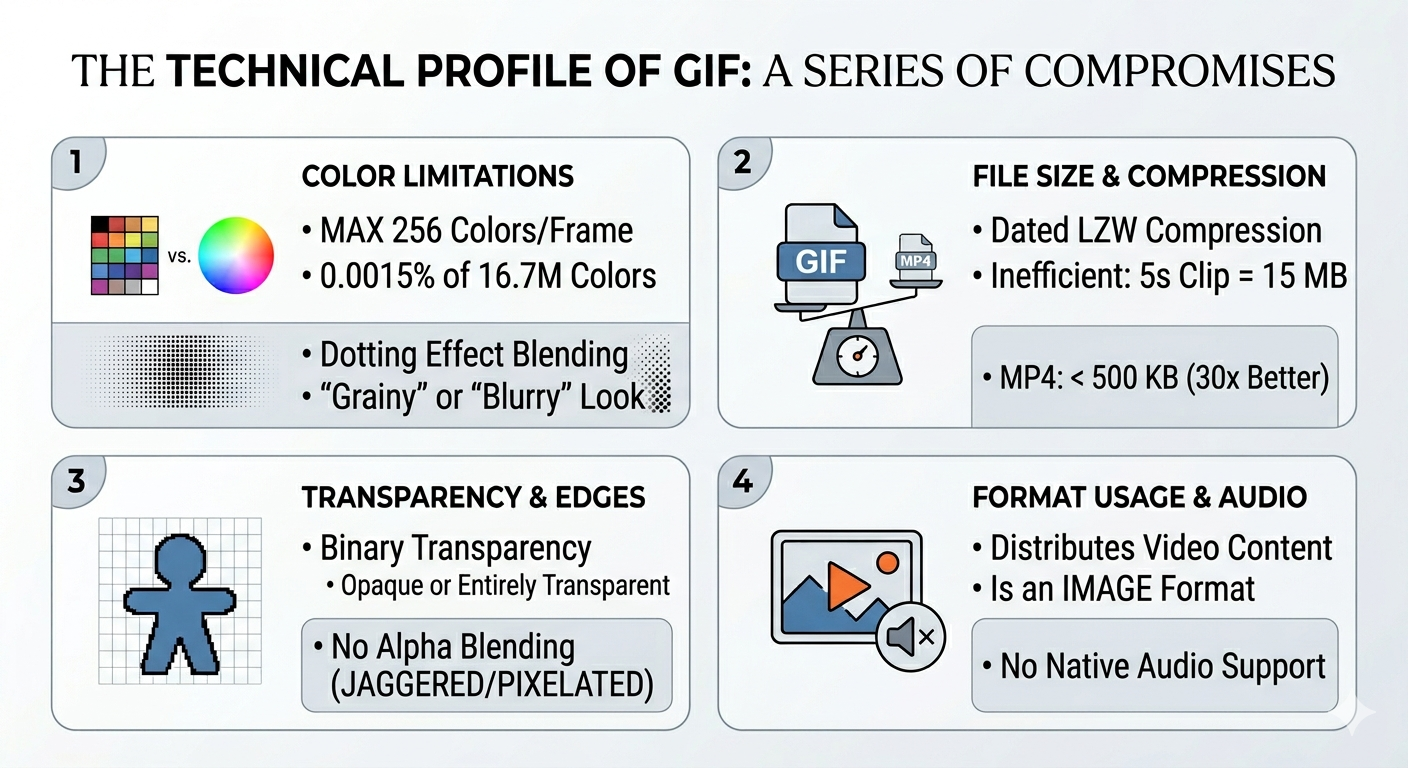
The technical profile of the GIF is a series of compromises. It is restricted to a maximum of 256 colors per frame, meaning that on modern displays capable of 16.7 million colors, a GIF utilizes only about 0.0015% of the available spectrum. To make up for this, GIF uses a dotting effect to blend colors, which is why these files often look grainy or blurry.
The inefficiency of GIFs is even more apparent in its file size. Because GIFs rely on the dated LZW compression algorithm, a simple five-second clip can reach 15 MB. In contrast, an MP4 of the same content often stays under 500 KB, a notable difference in data efficiency.
The format also handles transparency with a binary approach: pixels are either entirely opaque or entirely transparent. This lack of alpha blending or semi-transparency is responsible for the jagged, pixelated edges often seen around cutouts. Finally, while GIF is technically an image format, it is frequently used to distribute video content despite a lack of native audio support.
Why GIF Won't Die
So why does this outdated format persist despite its shortcomings? The reasons are more sociological than technical:
- Universal Compatibility. GIF works everywhere - every browser, operating system, messaging app, and email client. You don't need to check compatibility or worry about fallbacks; you simply drop a file and it plays. That level of reliability is rare and incredibly valuable.
-
The Interaction Model. By autoplaying and looping infinitely without playback controls, GIFs act more like moving stickers than videos. You don't click play or scrub a timeline; the emotion is conveyed instantly and seamlessly. Video requires specific attributes like
autoplay loop muted playsinlinejust to facilitate this behavior. - Cultural Branding. The word "GIF" has become a cultural noun and the generic term for any short looping animation. Even when the underlying technology is actually an MP4, users still call it a GIF. This level of brand recognition and familiarity is nearly impossible to undo.
Animated WebP: Smaller Files, Full Color, Alpha
Animated WebP has been available since 2014, and it outperforms GIF in most technical categories. WebP offers full 24-bit color and full alpha transparency, allowing for smoother gradients and crisper edges. It is also noticeably more efficient; Google's own benchmarks put animated WebP at roughly 30-50% smaller than GIF at equivalent quality, with some content compressing even better.
The efficiency of the format comes from its roots in the VP8 video codec. Instead of saving every individual frame as a complete image, WebP uses inter-frame prediction, which only records the changes between frames. This clever method has been universally supported by all major web browsers since 2022.
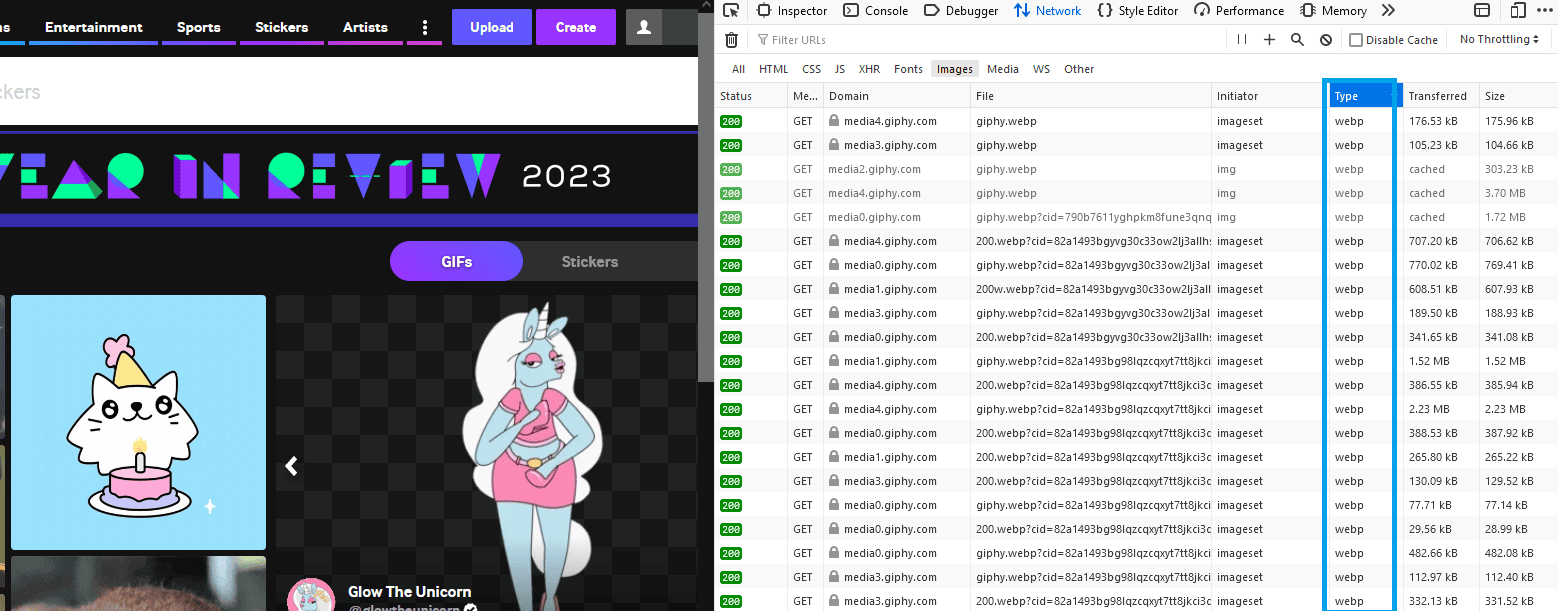
And here's the quiet irony: if you inspect the network traffic on major platforms like Giphy or Tenor, you will discover that the "GIFs" you are viewing are almost always WebP files. These platforms, which built their brands on the GIF legacy, have quietly transitioned to WebP to save on massive bandwidth costs. They continue to use the term GIF because users are generally more interested in the content than the technical container.
Animated AVIF: Even Better, Even Slower to Arrive
AV1 Image File Format (AVIF), the format derived from the AV1 video codec, also supports animation. And predictably, it's even more efficient than animated WebP. Early benchmarks show animated AVIF files offering meaningful compression gains over animated WebP at equivalent quality, though the exact savings vary widely depending on the content. The color depth goes up to 12-bit, HDR is supported natively, and the compression artifacts are less noticeable because AV1's compression model is simply a generation more advanced.
The catch is that the AVIF format has a significant trade-off in performance. Encoding an animated AVIF is a slow process that can take several minutes for a short clip, even on modern hardware. While this delay is manageable for a single still image, it becomes a major obstacle for animations containing hundreds of frames. This high computational cost makes it difficult for systems to convert these files in real time.
Browser support is another factor to consider. While Chrome and Firefox handle the format well and Safari has recently added support, it is not yet as universal as WebP. For platforms like Content Delivery Networks that must process millions of uploads instantly, AVIF is not quite ready for high-volume pipelines in 2026. The technology is promising, but the infrastructure to support it at scale is still maturing.
APNG: PNG Animation with Uneven Adoption
APNG (Animated PNG), is a format with a history defined by missed opportunities. Mozilla proposed the standard in 2004 as a direct successor to the GIF. It functions as an extension of the standard PNG format, offering full 24-bit color, alpha transparency, and lossless compression.
Despite these benefits, the PNG Development Group officially rejected the proposal. They favored a different standard called MNG, which was technically advanced but so complex that web browsers never adopted it. While MNG eventually failed, APNG survived as a niche standard. For many years, Firefox was the only major browser to support it.
Eventually, other browsers followed. Safari integrated support years ago, and Chrome added it in 2017. Today, APNG is supported by every major browser, yet it remains largely unused. Because PNG compression was not designed to handle the differences between frames, APNG files are often larger than GIFs for complex animations.
APNG now occupies a narrow territory. It offers better quality than GIF but lacks the compression of WebP or AVIF, so it is mostly reserved for tasks that require lossless quality and transparency, such as UI mockups or animated icons.
Just Use a Video
For any content longer than two seconds or larger than 200 pixels, video formats like MP4 or WebM are significantly more efficient than animated image formats. They provide better visual quality while maintaining much smaller file sizes.
The following table illustrates the typical size differences between formats. These figures are approximate, as actual sizes depend on the complexity of the visual content:
| Content | GIF | Animated WebP | Animated AVIF | MP4 (H.264) | WebM (VP9) |
|---|---|---|---|---|---|
| 5-second clip, 480p | ~12 MB | ~4 MB | ~2 MB | ~300 KB | ~250 KB |
| 3-second reaction, 320p | ~5 MB | ~1.5 MB | ~800 KB | ~150 KB | ~120 KB |
| 2-second UI animation, 200p | ~800 KB | ~250 KB | ~130 KB | ~50 KB | ~40 KB |
Video codecs succeed where image formats fail because they use advanced compression techniques. Methods such as long-range motion prediction and sophisticated rate control allow video to achieve ratios that animated images cannot match.
The practical argument against video has always been the UX question:
videos have play buttons, loading states, controls. But HTML5 solved
this years ago. A
<video autoplay loop muted playsinline> tag behaves
almost identically to an animated image from the user's perspective. It
auto-plays, loops, and sits inline in the page. The differences are
subtle - slightly different loading behavior, the need for the
muted attribute to allow autoplay, potential issues with
iOS power-saving restrictions.
From a performance standpoint, the choice is clear. If you are adding an animation to a website, a video element is almost always the better option. The bandwidth savings are substantial. This is why performance tools highlight large animated GIFs. Serving a 12 MB file when a 300 KB video would look the same is a significant waste of loading time and data.
Browser Support in 2026
Here's a summary of animated image formats to save you the trouble of looking them up:
- Animated GIF: Everything. Everywhere. Since 1995.
- Animated WebP: All modern browsers. Universal since Safari 14 (late 2020). Safe to use without fallbacks.
- Animated AVIF: Chrome 94+, Firefox 113+, Safari 17+. Effectively universal on current browser versions, but older browsers still in the wild won't handle it.
- APNG: All modern browsers. Chrome 59+ (2017), Firefox since forever, Safari since forever. Edge since Chromium switch.
- MP4 (H.264): Everything. Better supported than any animated image format except GIF itself.
- WebM (VP9): Chrome, Firefox, Edge. Safari added support in recent versions but it's been inconsistent.
Today, the safest bet for using animated content on the web is to serve a
<video> element with an MP4 source. If you
specifically need an image format for contexts where video tags aren't
supported, like email or chat embeds, use animated WebP with a GIF
fallback for the handful of very old browsers still in use.
Practical Recommendations
In practice, there is little reason to create an actual .gif file for modern web use. If you need a short looping animation on a webpage, video is the superior choice. For sharing reactions in a group chat, the platform handles the technical details for you, usually serving a more efficient format behind the scenes. For high-quality animations that require transparency, such as user interface demos, animated WebP is the most effective solution.
While the GIF file format has technically been obsolete for years, the concept of the GIF remains a permanent part of digital culture. The short, looping, silent animation is here to stay. Even as the underlying technology continues to evolve, most people will likely continue to call these animations GIFs, regardless of the format actually being used.